what is an optical drive

A staple for CD/DVD/Blu-ray era users, it’s a common question for cloud/USB-era audiences. This blog answers "what is an optical drive?", covering its working principle, types, history and modern role.
What Is an Optical Drive?
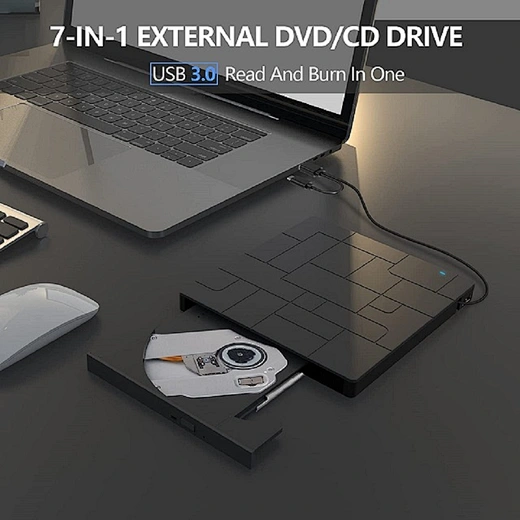
Core question: what is an optical drive? A hardware device using laser tech to read/write data on optical media (CDs, DVDs, Blu-rays). Unlike HDDs (magnetic heads) or SSDs (flash memory), it relies on laser reflection/refraction.
An optical drive acts as an optical disc "reader/writer", with laser assembly, spinning motor and focusing lens. It scans "pits" and "lands" (0s/1s) on spinning discs; for writing, laser heats disc areas to create these patterns.
Key distinction: It’s the interface device—discs are non-functional without it.
How Does an Optical Drive Work?
Optical drive operation relies on laser mechanics. Core process:
1. The Optical Disc: The Storage Medium
Optical discs have polycarbonate base, aluminum reflective layer, protective coating and label. Data is stored as microscopic "pits" and "lands" in a spiral track (pits ~0.5 microns wide).
2. Reading Data: Laser Reflection and Detection
Optical drive reading steps:
Writeable optical drives use higher-power lasers, with two core technologies:
Adopted early 1980s (music first, then data), 780nm infrared laser. Key specs:
Late 1990s CD replacement, 650nm red laser (more storage). Key specs:
Mid-2000s for HD video/large data, 405nm blue-violet laser. Key specs:
Multi-format drives:
Key milestones for understanding "what is an optical drive?":
1970s–1980s: Birth of the CD
1979: Philips/Sony develop CD; 1982: First CD player; 1985: First CD-ROM. Replaced floppies.
1990s: Rise of the DVD
Mid-1990s: DVD developed; 1996: First DVD players. 2000s standard in computers/ homes.
2000s–2010s: Blu-ray and Alternatives
2006: Blu-ray launched (won HD DVD war). Rise of USB/HDDs/cloud storage led to decline.
2010s–Present: Phasing Out
Mid-2010s: Laptop makers removed optical drives. Rare in consumer PCs; used in professional archiving/entertainment.
The Role of Optical Drives Today
Niche uses remain:
1. Home Entertainment
Necessary for CD/DVD/Blu-ray collections; Ultra HD Blu-ray popular for 4K.
2. Data Archiving
Blu-rays reliable for long-term storage (50-year lifespan); used by businesses/government.
3. Legacy Software and Media
Required for old CD/DVD software or CD music ripping.
4. Professional Applications
Used to distribute large files (raw footage) via Blu-rays in creative fields.
What Is an Optical Drive?
Core question: what is an optical drive? A hardware device using laser tech to read/write data on optical media (CDs, DVDs, Blu-rays). Unlike HDDs (magnetic heads) or SSDs (flash memory), it relies on laser reflection/refraction.
An optical drive acts as an optical disc "reader/writer", with laser assembly, spinning motor and focusing lens. It scans "pits" and "lands" (0s/1s) on spinning discs; for writing, laser heats disc areas to create these patterns.
Key distinction: It’s the interface device—discs are non-functional without it.
How Does an Optical Drive Work?
Optical drive operation relies on laser mechanics. Core process:
1. The Optical Disc: The Storage Medium
Optical discs have polycarbonate base, aluminum reflective layer, protective coating and label. Data is stored as microscopic "pits" and "lands" in a spiral track (pits ~0.5 microns wide).
2. Reading Data: Laser Reflection and Detection
Optical drive reading steps:
- Disc Spinning: Motor spins disc at variable speed for constant data transfer.
- Laser Emission: Laser diode emits focused beam (wavelength varies by drive).
- Lens Focusing: Lenses focus laser on reflective layer (pits/lands location).
- Reflection and Detection: Laser reflects off lands, scatters off pits; photodetector converts light variations to digital data (0s/1s).
Writeable optical drives use higher-power lasers, with two core technologies:
- Ablation (CD-R/DVD-R): Dye layer darkened by laser to create permanent pits; non-erasable.
- Phase Change (CD-RW/DVD-RW/Blu-ray RW): Phase-change material switches state via laser; rewritable hundreds/thousands of times.
Laser precision enables significant storage relative to disc size.
Types of Optical Drives: From CDs to Blu-rays
Optical drives evolved to support CDs, DVDs and Blu-rays—key to understanding "what is an optical drive?":
1. CD Drives: The First Generation
Types of Optical Drives: From CDs to Blu-rays
Optical drives evolved to support CDs, DVDs and Blu-rays—key to understanding "what is an optical drive?":
1. CD Drives: The First Generation

Adopted early 1980s (music first, then data), 780nm infrared laser. Key specs:
- Storage: Up to 700 MB (80 mins audio).
- Speed: 1x (150 KB/s data); later 48x/52x.
- Types: CD-ROM (read-only), CD-R (write-once), CD-RW (rewritable).
Dominant 1990s-early 2000s; 700 MB capacity obsolete for large files.
2. DVD Drives: The Next Leap
2. DVD Drives: The Next Leap

Late 1990s CD replacement, 650nm red laser (more storage). Key specs:
- Storage: 4.7 GB (single-layer), 8.5 GB (dual-layer).
- Speed: 1x = 1.385 MB/s; later up to 24x.
- Types: DVD-ROM, DVD±R (write-once), DVD±RW (rewritable), DVD-RAM (specialized backup).
2000s standard; HD video made 4.7 GB insufficient.
3. Blu-ray Drives: High-Definition
3. Blu-ray Drives: High-Definition

Mid-2000s for HD video/large data, 405nm blue-violet laser. Key specs:
- Storage: 25 GB (single-layer), 50 GB (dual-layer), up to 128 GB (multi-layer).
- Speed: 1x = 4.5 MB/s; later up to 16x.
- Types: Blu-ray ROM, BD-RE (rewritable), BD-R (write-once), Ultra HD Blu-ray (4K).
Still used in entertainment systems (PS4/5, Xbox) and by 4K enthusiasts.
4. Combo Drives and Super Drives
4. Combo Drives and Super Drives

Multi-format drives:
- Combo Drive: Reads CDs/DVDs, writes only CDs.
- Super Drive (Apple): Reads/writes CDs/DVDs/Blu-rays; phased out 2012.
Key milestones for understanding "what is an optical drive?":
1970s–1980s: Birth of the CD
1979: Philips/Sony develop CD; 1982: First CD player; 1985: First CD-ROM. Replaced floppies.
1990s: Rise of the DVD
Mid-1990s: DVD developed; 1996: First DVD players. 2000s standard in computers/ homes.
2000s–2010s: Blu-ray and Alternatives
2006: Blu-ray launched (won HD DVD war). Rise of USB/HDDs/cloud storage led to decline.
2010s–Present: Phasing Out
Mid-2010s: Laptop makers removed optical drives. Rare in consumer PCs; used in professional archiving/entertainment.
The Role of Optical Drives Today
Niche uses remain:
1. Home Entertainment
Necessary for CD/DVD/Blu-ray collections; Ultra HD Blu-ray popular for 4K.
2. Data Archiving
Blu-rays reliable for long-term storage (50-year lifespan); used by businesses/government.
3. Legacy Software and Media
Required for old CD/DVD software or CD music ripping.
4. Professional Applications
Used to distribute large files (raw footage) via Blu-rays in creative fields.
Conclusion: What Is an Optical Drive, and Why Does It Still Matter?
Recap: what is an optical drive? A laser-based device for reading/writing optical discs. Once a staple, it declined with USB/SSDs/cloud but remains useful for entertainment, archiving and legacy media.
It reflects tech evolution, adapting from CD to Blu-ray. A reliable niche technology today.
Next time someone asks "what is an optical drive?", you’ll have a comprehensive answer covering definition, mechanics, history and modern role.
what is the function of the optical drive
why don't laptops come with dvd drives anymore