how does a selfie stick work
author: LJ
2026-02-09
If you’ve ever used a Selfie Stick (or wondered how it captures the perfect group photo or scenic selfie), you’re not alone: how does a selfie stick work is one of the most common questions for casual users and content creators alike. The good news? It’s simple—no fancy tech jargon, just a few key parts working together to help you take better shots, hands-free.
Key Parts of a Selfie Stick (That Make It Work)
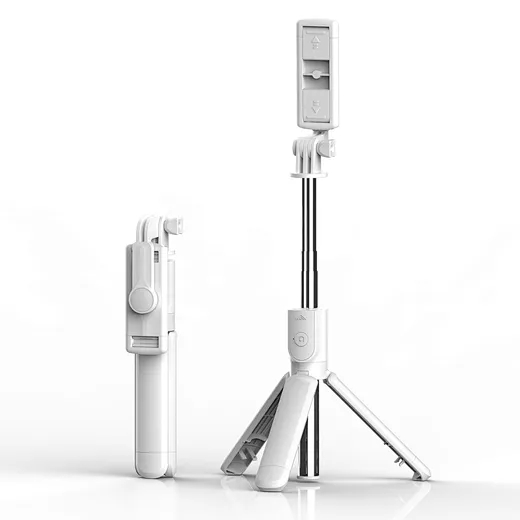
Every Selfie Stick (whether basic or high-end) has 3 core parts that power its function—once you know these, you’ll get how it works instantly:
· Telescopic Pole: The extendable arm of the Selfie Stick (usually 3–5 sections) that lets you reach farther than your arm—this is why it captures more people or scenery in your shot.
· Phone/Camera Clamp: The adjustable holder at the top that secures your phone or camera—most fit 4–7 inch phones (even with cases) and lock tight to avoid drops.
· Shutter Control: The button (on the handle) that takes the photo/video—this is the “magic” part that lets you shoot hands-free.
How Does a Selfie Stick Work? Step-by-Step Breakdown
Using (and understanding) a Selfie Stick takes 30 seconds—here’s the simple breakdown of how it works:
1. Secure Your Device: Open the Selfie Stick’s clamp, place your phone/camera in it (camera facing outward), and tighten the clamp until it’s secure.
2. Extend the Pole: Pull or twist the telescopic sections to reach your desired length (avoid extending fully for stability)—this gets your device farther away to fit more in the frame.
3. Take the Shot: Hold the Selfie Stick’s handle, frame your photo/video, and press the shutter button on the handle. That’s it!

How the Shutter Control Works (2 Common Types)
The shutter button is what makes a Selfie Stick hands-free—here are the two ways it connects to your device (super simple):
· Bluetooth: Most modern Selfie Sticks pair with your phone via Bluetooth. Once connected, the handle’s button acts like a remote—press it, and your phone takes the shot.
· Wired: Cheaper Selfie Sticks plug into your phone’s USB-C or audio jack. No pairing needed—plug it in, and the button triggers your camera instantly.
Quick Pro Tip for Better Selfie Stick Use
To get the most out of your Selfie Stick: Hold it at eye level (not below—avoids unflattering shadows) and don’t extend it fully (keeps it stable). For group shots, angle it slightly downward to fit everyone in!
Final Thought
So, how does a selfie stick work? It’s just an extendable pole with a secure clamp and a remote shutter—designed to help you take better, hands-free photos without asking a stranger for help. A Selfie Stick is simple, portable, and perfect for travelers, groups, and anyone who wants to capture moments easily.
where can i buy a camera tripod
are wireless lavalier microphones good
Related Article
Confused about how to fix half moon wall light? Our simple quick tips help you troubleshoot common issues and get your cozy fixture working again fast.
how to fix half moon wall light
In the age of TikTok, Instagram Reels, and 24/7 live broadcasting, the Selfie Stick has evolved from a "tourist gadget" into an essential professional tool.
who invented selfie stick